# Setting up Metamask wallet for BPX Chain (Mobile app)

1\. Open **MetaMask**. Expand the list of available networks.

[![metamask-mobile1.PNG](https://docs.bpxchain.cc/uploads/images/gallery/2024-11/scaled-1680-/ejwhE9hEqRIAa2PB-metamask-mobile1.PNG)](https://docs.bpxchain.cc/uploads/images/gallery/2024-11/ejwhE9hEqRIAa2PB-metamask-mobile1.PNG)

2\. Select "**Add Network**".

[![metamask-mobile2.PNG](https://docs.bpxchain.cc/uploads/images/gallery/2024-11/scaled-1680-/of3ZP46xQOyHIC1A-metamask-mobile2.PNG)](https://docs.bpxchain.cc/uploads/images/gallery/2024-11/of3ZP46xQOyHIC1A-metamask-mobile2.PNG)

3\. Go to the "**Custom networks**" tab.

<div class="flex-1 overflow-hidden" id="bkmrk--2"><div class="h-full"><div class="react-scroll-to-bottom--css-bpdgj-79elbk h-full"><div class="react-scroll-to-bottom--css-bpdgj-1n7m0yu"><div class="flex flex-col text-sm"><article class="w-full text-token-text-primary focus-visible:outline-2 focus-visible:outline-offset-[-4px]" data-scroll-anchor="true" data-testid="conversation-turn-21" dir="auto"><div class="m-auto text-base py-[18px] px-3 md:px-4 w-full md:px-5 lg:px-4 xl:px-5"><div class="mx-auto flex flex-1 gap-4 text-base md:gap-5 lg:gap-6 md:max-w-3xl lg:max-w-[40rem] xl:max-w-[48rem]"><div class="group/conversation-turn relative flex w-full min-w-0 flex-col agent-turn"><div class="flex-col gap-1 md:gap-3"><div class="flex max-w-full flex-col flex-grow"><div class="min-h-8 text-message flex w-full flex-col items-end gap-2 whitespace-normal break-words [.text-message+&]:mt-5" data-message-author-role="assistant" data-message-id="b292484f-d438-46a0-a203-dea886152b70" data-message-model-slug="gpt-4o" dir="auto"><div class="flex w-full flex-col gap-1 empty:hidden first:pt-[3px]"></div></div></div></div></div></div></div></article></div></div></div></div></div>[![metamask-mobile3.PNG](https://docs.bpxchain.cc/uploads/images/gallery/2024-11/scaled-1680-/RXB1JmyFTRaWnRtt-metamask-mobile3.PNG)](https://docs.bpxchain.cc/uploads/images/gallery/2024-11/RXB1JmyFTRaWnRtt-metamask-mobile3.PNG)

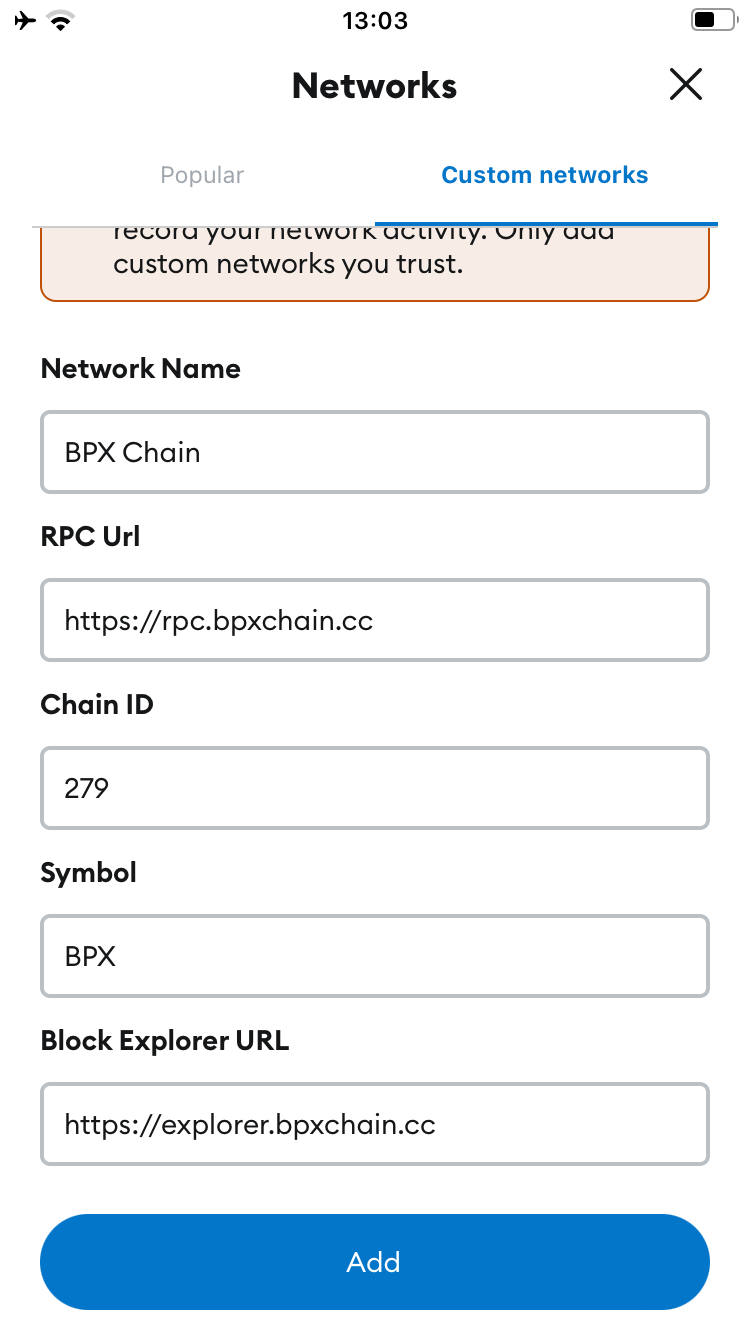
4\. Fill out the form as follows and confirm:

<p class="callout info">**Network name:** BPX Chain  
**Default RPC URL:** https://rpc.bpxchain.cc  
**Chain ID:** 279  
**Currency symbol:** BPX  
**Block explorer URL:** https://explorer.bpxchain.cc</p>

[![metamask-mobile4.PNG](https://docs.bpxchain.cc/uploads/images/gallery/2024-11/scaled-1680-/TwwSjQo1AA8gN70a-metamask-mobile4.PNG)](https://docs.bpxchain.cc/uploads/images/gallery/2024-11/TwwSjQo1AA8gN70a-metamask-mobile4.PNG)

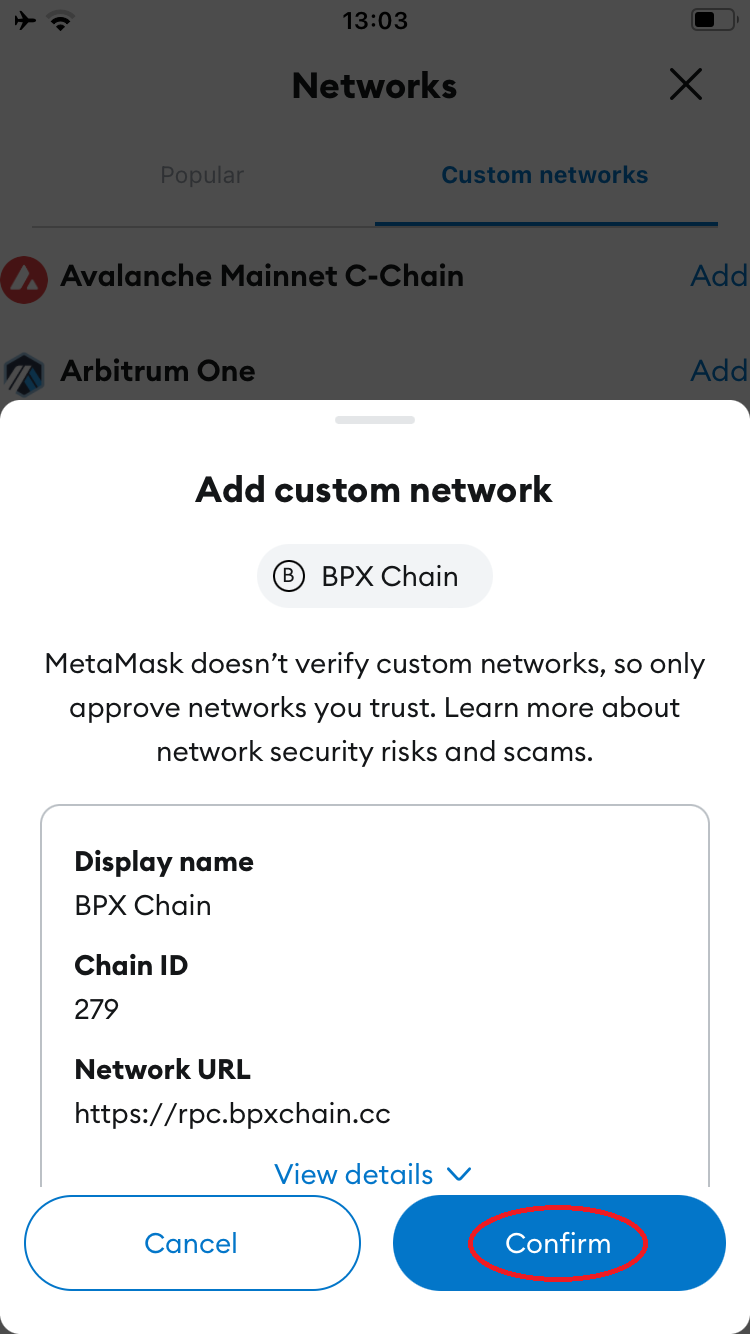
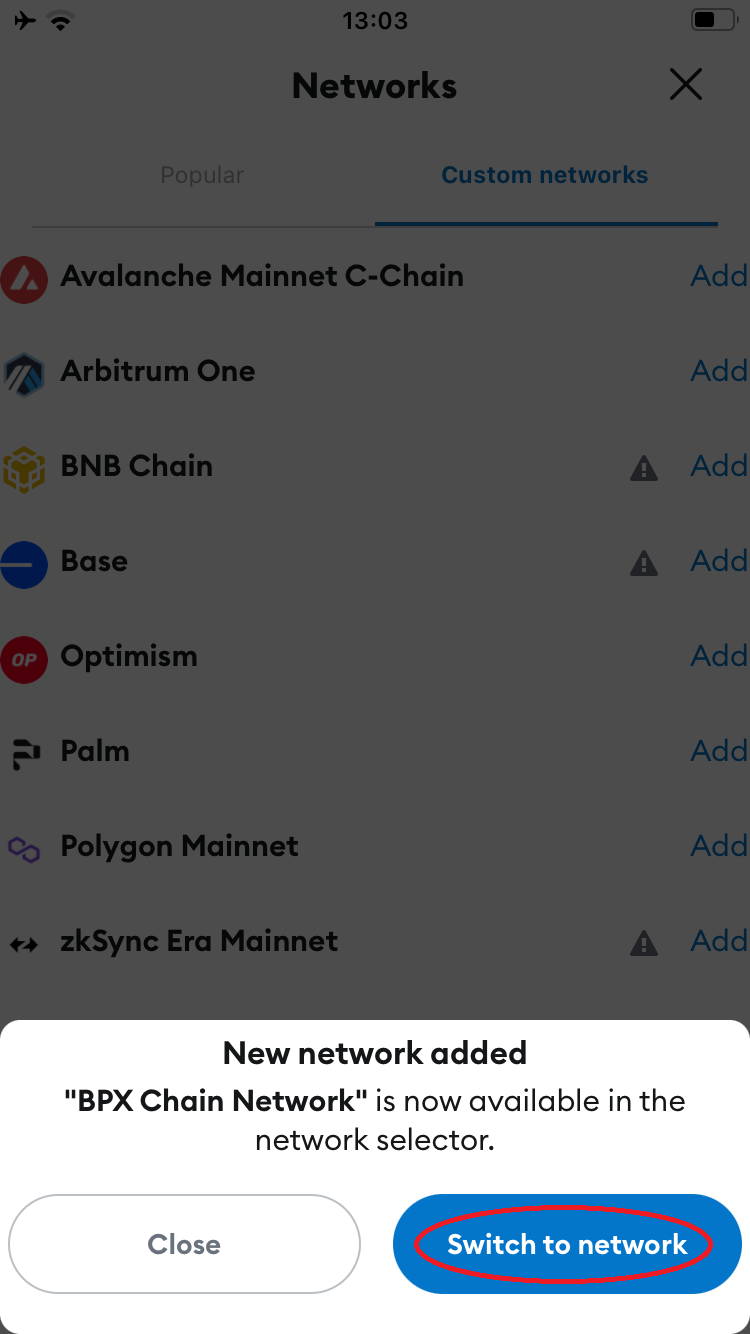
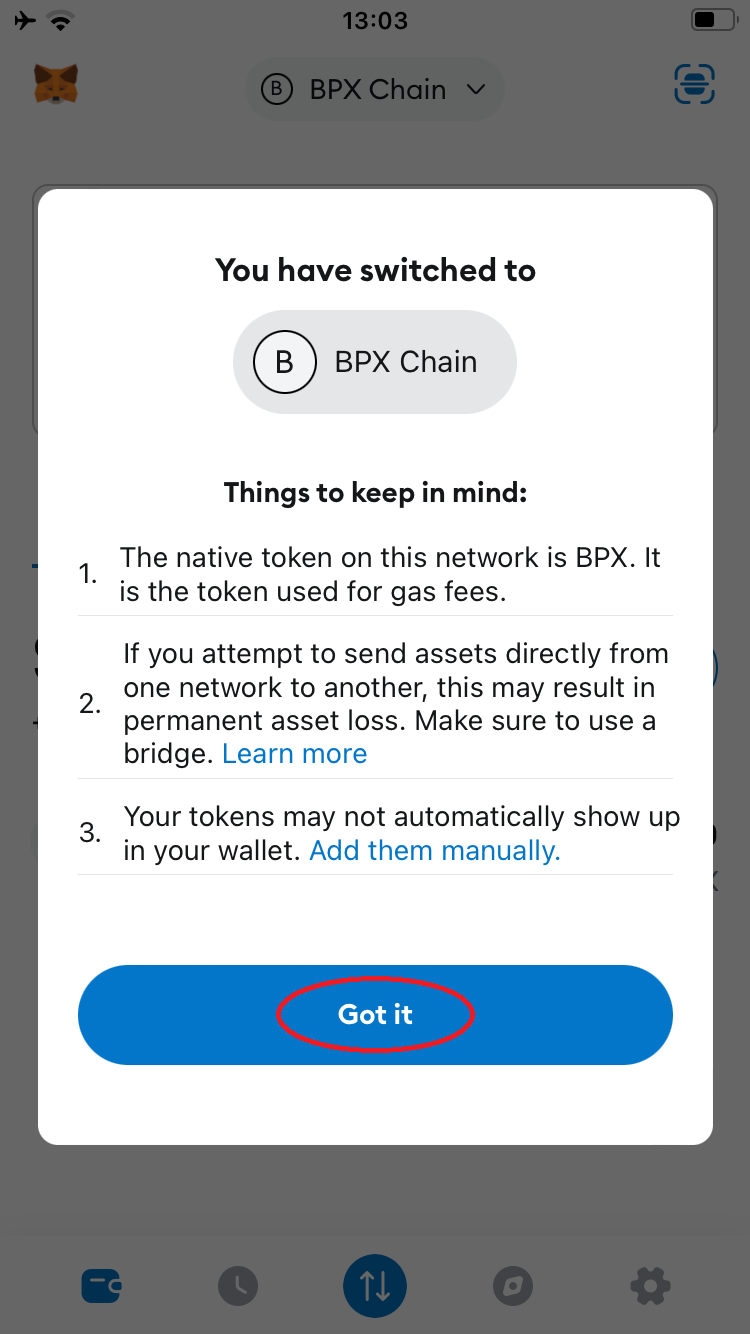
5\. Proceed through the next steps by tapping "**Confirm**", "**Switch to network**", and "**Got it**".

[![metamask-mobile5.PNG](https://docs.bpxchain.cc/uploads/images/gallery/2024-11/scaled-1680-/v6m41dIdTYh8Wd68-metamask-mobile5.PNG) ](https://docs.bpxchain.cc/uploads/images/gallery/2024-11/v6m41dIdTYh8Wd68-metamask-mobile5.PNG)[![metamask-mobile6.PNG](https://docs.bpxchain.cc/uploads/images/gallery/2024-11/scaled-1680-/FzoiqPrQeYFEvuHk-metamask-mobile6.PNG) ](https://docs.bpxchain.cc/uploads/images/gallery/2024-11/FzoiqPrQeYFEvuHk-metamask-mobile6.PNG)[![metamask-mobile7.PNG](https://docs.bpxchain.cc/uploads/images/gallery/2024-11/scaled-1680-/zTp33wAFcgYrSLDK-metamask-mobile7.PNG)](https://docs.bpxchain.cc/uploads/images/gallery/2024-11/zTp33wAFcgYrSLDK-metamask-mobile7.PNG)
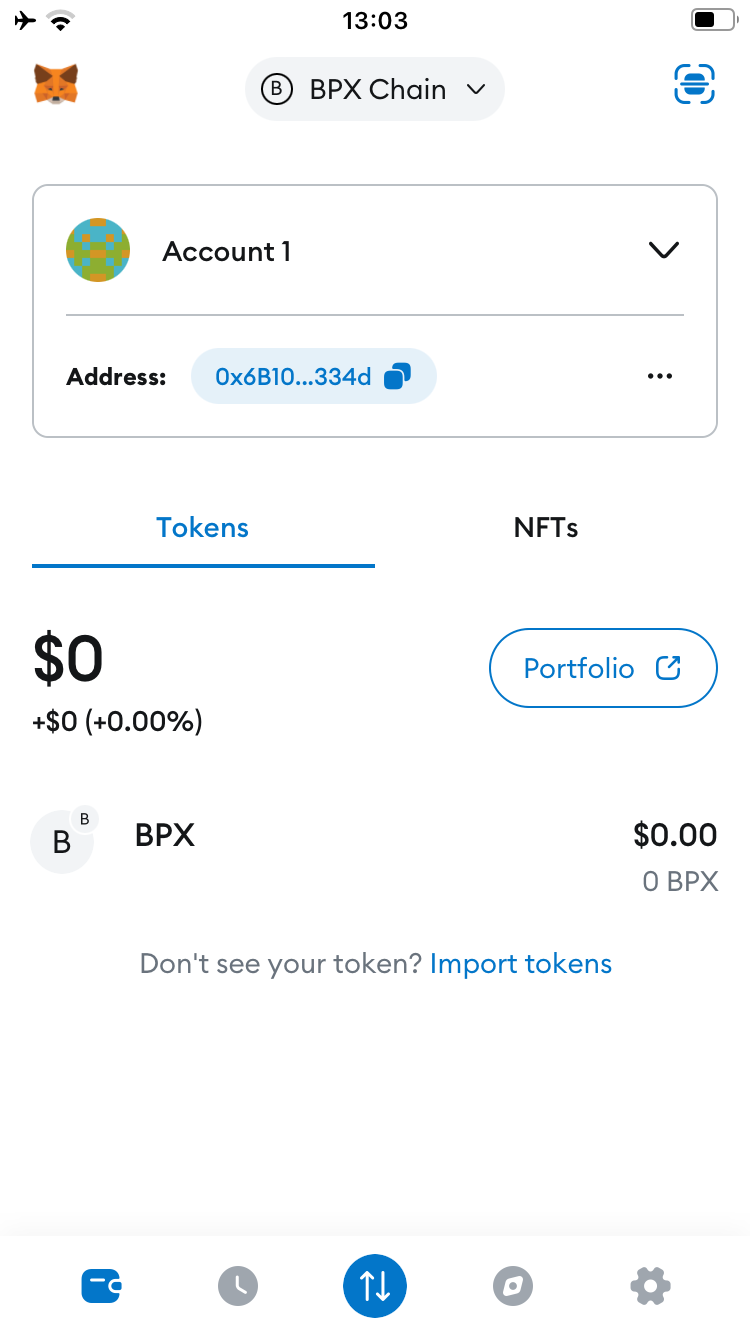
6\. Your wallet is now ready to use.

[![metamask-mobile8.PNG](https://docs.bpxchain.cc/uploads/images/gallery/2024-11/scaled-1680-/AhCXbhwtI9K1BGBT-metamask-mobile8.PNG)](https://docs.bpxchain.cc/uploads/images/gallery/2024-11/AhCXbhwtI9K1BGBT-metamask-mobile8.PNG)